 Skip to main content





Key features of ADLL include:
- Electronic Notices to Mariners (NMs) updates and information search, giving greater efficiency, faster updating and more flexible information access
- Global coverage to enable safe and compliant navigation through major commercial shipping routes and ports
- Approved for use by the Flag States of over 80% of ships trading internationally, with certification to aid inspections


Familiarity and reassurance
ADLL displays information using easily recognisable formats from printed publications, providing reassurance for users as they switch to digital applications.

Compliance with SOLAS requirements
ADLL is widely accepted as meeting SOLAS carriage requirements and is approved for use by the Flag States of over 80% of ships trading internationally; meaning ongoing safety and compliance for your ships, cargo and crew.

Easy search and print options
Crews can find lights information quickly using the map interface, the ship’s position or a keyword search. This information can then be easily printed for use in navigational activities such as passage planning.

Fast and efficient updates
ADLL allows users to download weekly electronic updates by internet or disc. These can be applied accurately with minimum manual intervention; significantly reducing time spent making manual updates and minimising the risk of human error on board.

Comprehensive coverage of light and fog signal information
Keeping bridge crews informed, compliant and up-to-date, ADLL contains comprehensive coverage of more than 90,000 individual fixed light structures including Lighthouses, Lightships and Fog signals. ADLL also contains a number of Lit floating marks including Pontoon lights, resilient and buoyant beacons, Single Point Moorings (SPM) & Floating Production, Storage and Offloading Facilities (FPSO).
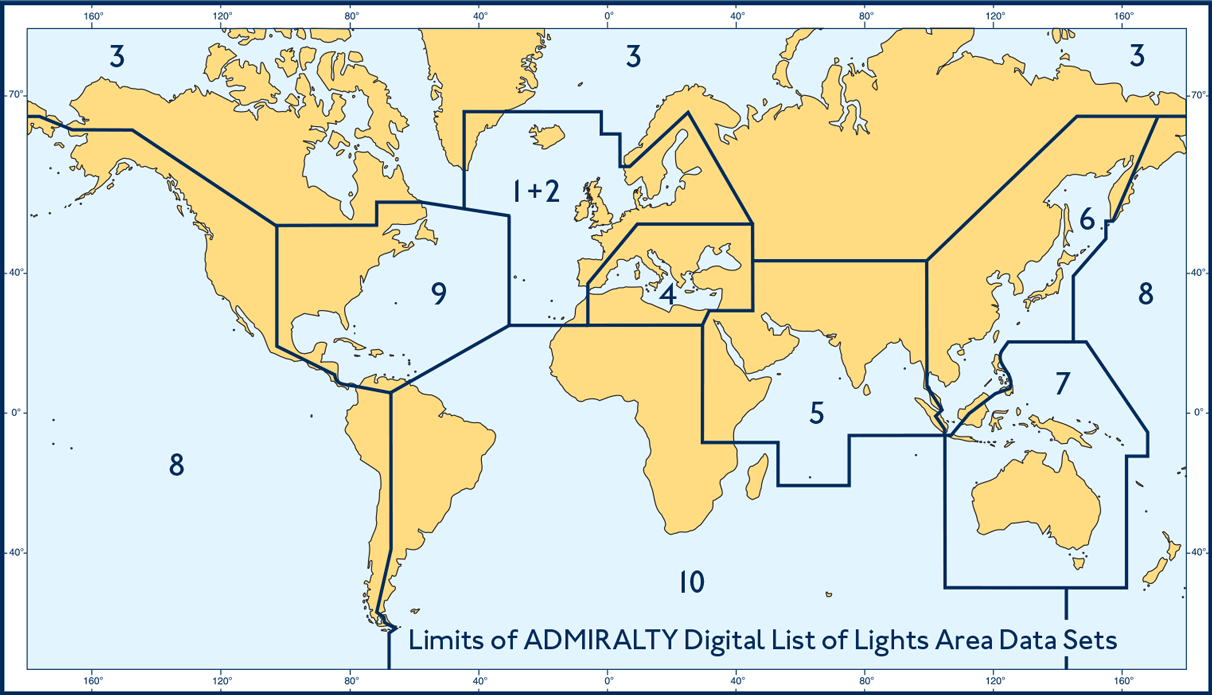
This global coverage is divided into 10 folios, giving lights information for locations across the world.
ADLL equivalents in List of Lights Paper Publications
To help you purchase the most suitable ADLL Areas, you can check the ADLL equivalents in List of Lights Paper Publications.
| Flag State | ADP | AENP | Documentation | Comments |
|---|---|---|---|---|
| Please apply filters to view results | ||||
Recommended minimum requirements
Admiralty Digital List of Lights (ADLL) will run on any PC that meets Microsoft supported operating systems.
Operating systems should have the most recent Service Pack installed. In addition, systems will require: a DVD drive, keyboard, Microsoft mouse (or some other compatible pointing device), super VGA (800 x 600) video adapter or better with suitable monitor and at least 1GB of available disk space.
Important notes:
- Systems should be capable of receiving emails up to 1.25Mb in size.
- ADLL and other Admiralty Digital Publications (ADP) can be installed on any standalone computer, which meets the hardware recommendations for the operating system installed
- ADLL is designed to be registered to individual PCs and is not suitable for use across a network
- We will not be in a position to support ADP on Operating Systems where Microsoft support has been withdrawn
ADMIRALTY Digital Publications Software Developer Kit (SDK) and Developer's Pack
Our SDK allows you to integrate ADP into your ECDIS or application. You can find out more about the kit and how to access our technical resources on our Admiralty Digital Publications SDK page.
ADP Online Updating Service
We supply all ADLL customers with weekly electronic updates via Internet download, email or disc. If you are unable to take advantage of the automatic updating option for ADLL, you can get your updates using our online updating service. On this site you can download and apply updates by area to:
- Admiralty Digital List of Lights
- Admiralty Digital Radio Signals 1, 3, 4, 5
- Admiralty Digital Radio Signals 2
- Admiralty Digital Radio Signals 6
- Admiralty TotalTide
The ADP user guide
Includes information on getting started, installation, updates, maintenance, uninstalling and other support topics.
ADP support films
Guides to activation, downloading updates, generating a support file and uninstalling ADP are all available on our YouTube Channel, ADMIRALTY TV.
Downloading ADP software
ADP software can be downloaded from our public File Share Service website at https://fss.admiralty.co.uk. Please note that new users will need to register to use the site.
A search for software will display the ADP software installation files.
Who to contact?
In the first instance, please contact the Distributor that you purchased ADLL from. If they are unable to help then the UKHO Customer Services Team can be contacted on customerservices@ukho.gov.uk or phone +44 (0) 1823 484444.
How to use the ADP Updates and Software DVD
Includes information on updating your ADP and e-Readers 1.3 and 1.4 applications using the ADP Updates and Software DVD.
End-user Licence Agreement (EULA)
Please find the End-user Licence Agreement for Admiralty digital data services below.
Choosing, ordering and managing your ADLL Licence
Admiralty Digital List of Lights is sold through an international network of experienced and trusted distributors.
Please contact your Admiralty Distributor to discuss the right package of charts for you and the appropriate pricing model. If you don’t have a preferred distributor, then you can search a list of worldwide Admiralty Distributors on our find an Admiralty Distributor page.
The Admiralty Digital Catalogue (ADC) can also provide you with a comprehensive and up-to-date reference of current Admiralty products and services, with functionality that allows you to search for products by type, scale or a defined route.