 Skip to main content



In today’s digital-first bridge environment, the ability to rapidly interpret Electronic Navigational Chart (ENC) symbology is a necessary part of safe navigation and an essential skill for all mariners.
However, a recent NorthStandard ECDIS Training Assessment report revealed over 50% of bridge teams struggle to identify common symbols found on ENCs. The same report found that many mariners do not regularly use the system's built-in interrogation tools – including the ‘pick report’ and ‘hover-over’ functions – which means safety-critical data held in digital layers could be going unread.
This short guide explains some of the key symbols bridge teams are most likely to encounter – based on the Admiralty Guide to ENC Symbols used in ECDIS (NP5012) – as well as the tools available to interrogate them.
Key symbols to recognise
ENCs use specific symbols to highlight hazards that may not be immediately obvious from the chart display alone, including:

The isolated danger symbol
The isolated danger symbol is represented with a magenta X. It appears when a submerged wreck, rock or obstruction has a depth equal to or shallower than the vessel's safety contour, but sits within water that would otherwise be considered safe.
It is a targeted warning: the surrounding water may be deep enough, but a specific hazard exists at that point. The ‘pick report’ function (covered below) will confirm exactly what the symbol represents in each case.
The unknown object
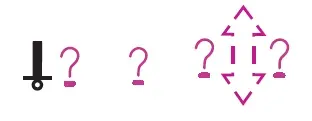
If your ECDIS encounters a feature it doesn't recognise, it will display a question mark – this is often because the system lacks the latest IHO Presentation Library update.
This is a system-generated red flag: the ECDIS knows something is there but cannot tell you what it is.
Traditional vs simplified symbology
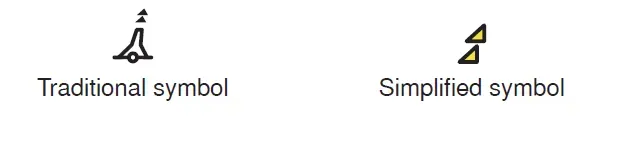
ECDIS can display certain features using either simplified or traditional symbology.
Traditional symbology is similar to symbols used in paper charts, whereas simplified symbols try to convey the meaning of the feature using a symbol shape and colour combination. Simplified symbology is primarily used for aids to navigation.
For a comprehensive guide to all symbols used on ENCs, refer to the Admiralty Guide to ENC Symbols used in ECDIS (NP5012).
User-customisable display settings
ECDIS display is dynamic. The same ENC may appear differently depending on the display layers, safety settings and symbol options selected by the user.
Settings such as text display, depth shades, shallow water pattern, safety contour, scamin and traditional or simplified symbology can all affect how information is presented. These settings may be configured to support stages of the passage and saved as individual profiles. It is important for users to be aware what profile is selected and the implications for ENC display.
ECDIS Chart 1: your on-board reference
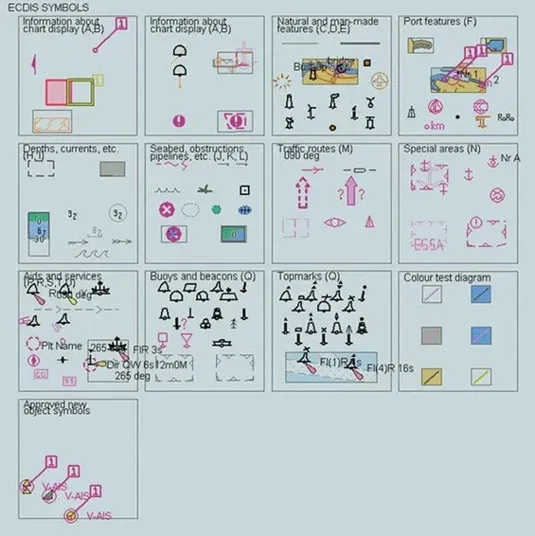
When an unfamiliar symbol appears on the chart, bridge teams do not need to guess its meaning. Every type-approved ECDIS is required to have ECDIS Chart 1 installed.
This is a dedicated ENC data set that acts as a built-in legend. It contains every symbol used in your system’s presentation library.
Because it is an ENC itself, you can use the Pick Report function on any symbol within Chart 1 to get a full explanation of what that symbol means and what conditions will trigger its display.
Using pick reports and hover-over functions for chart interrogation
Because digital screens can quickly become cluttered, much of the data required for safe navigation is hidden. The ECDIS only displays a fraction of a feature’s attributes visually.
Pick reports
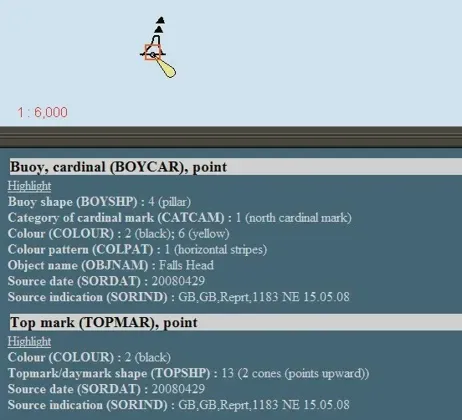
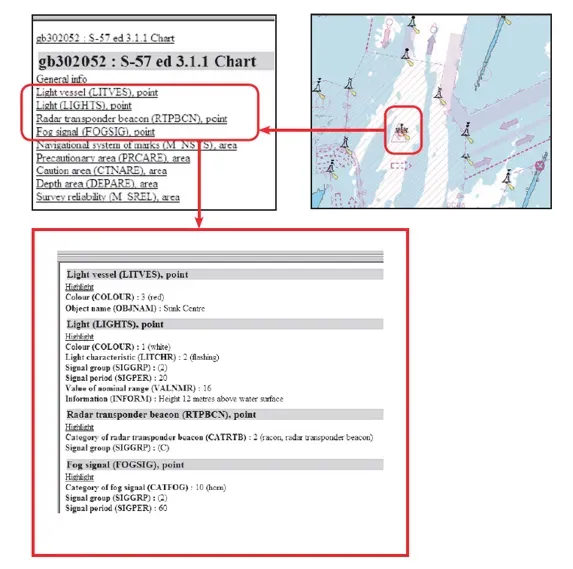
You can generate a pick report by clicking on a feature. This is the only way to find ‘hidden’ data such as light characteristics, the exact nature of a restricted area, or the ‘Survey Reliability (M_SREL)’ which tells you how much to trust the charted depths.
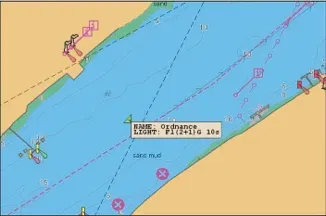
Images: Typical ECDIS pick report for 'Falls Head' cardinal buoy
Hover-over function
Modern ECDIS systems (Presentation Library 4.0 and later) allow you to simply hover over features like lights, beacons, buoys and landmarks to see their names and characteristics instantly. This provides quick situational awareness without disrupting your primary display.
Navigators should not rely only on chart symbols alone when using ECDIS; using the hover-over and pick report functions ensure the officer is using all available ENC information – which is an essential part of safe bridge practice.
Supporting confident ECDIS use
For mariners seeking to deepen their understanding, the Admiralty Guide to ENC Symbols used in ECDIS (NP5012) is the definitive guide to symbology used in ENCs.
It provides detailed explanations and descriptions of both traditional and simplified forms of ENC symbols, including:
- Information on the Presentation Library, display settings and interrogation tools
- Detailed symbology guides
- Easy reference tools and indexes
Read more on this topic

Search Title
Reducing friction in passage planning
Efficient passage planning depends on bringing together trusted information from multiple sources. As the volume of information available to bridge teams grows, the challenge is increasingly about finding what matters and understanding it efficiently. We explore how reducing unnecessary friction can give navigators more time to focus on the decisions that support safe navigation.
Search Title
Understanding ECDIS: Beyond the default 30m safety contour
Setting the ECDIS safety contour correctly is one of the most effective things a bridge team can do to prevent grounding. When configured for the vessel's actual draught, margins and operating conditions, it controls how depth information is displayed in ECDIS and alerts the crew before the vessel approaches unsafe water.
Search Title
Understanding ECDIS alerts: How to reduce alarm fatigue
For most navigators, the sound of an ECDIS alert is unmistakable. Depending on the watch, an ECDIS alert can mean anything from a routine chart update to an imminent grounding risk. The challenge is knowing which is which – and acting accordingly.